

Summary
ARK-OS now ships an open source u-blox PointPerfect NTRIP client that streams centimeter-level GNSS corrections to your flight controller over MAVLink. No base station, no regional NTRIP network subscription — the client reports the vehicle’s position to u-blox’s caster, receives localized RTCM (or SPARTN) corrections, and injects them into the autopilot as GPS_RTCM_DATA. Enable it from the ARK-OS web UI, paste in your Thingstream credentials, and your RTK receiver converges anywhere in the PointPerfect coverage area. Source is on GitHub, MIT licensed.
Every RTK conversation eventually arrives at the same question: where are the corrections coming from? For years there have been two answers. You set up your own base station — survey it in, keep it powered, keep the radio link alive — or you subscribe to a regional NTRIP network and hope it has coverage where you’re flying. The accuracy is worth it. The logistics are the tax.
We just merged support for a third answer into ARK-OS: u-blox PointPerfect, delivered straight to the flight controller over MAVLink by a small open source client that runs on the companion computer. Toggle the service on, enter your credentials, and you get RTK-grade positioning with nothing else in the truck.
PPP-RTK, minus the base station
Traditional RTK is a differential technique. A base station at a known location observes the same satellites your vehicle does, and because most of the error — satellite clocks, orbits, atmospheric delay — is shared over short distances, the rover can cancel it out. That’s also why baseline length matters: get a few tens of kilometers from the base and the errors stop being shared.
PointPerfect takes a different approach, called PPP-RTK. Instead of broadcasting one station’s raw observations, u-blox models the error sources themselves — orbits, clocks, ionosphere, troposphere — across an entire continent, using a network of reference stations. Your receiver applies that state-space model at its own position. The result is PPP’s coverage with RTK-style convergence and accuracy: u-blox quotes 3–6 cm with convergence typically in seconds, across the contiguous US, Europe, and a growing list of other regions.
PointPerfect corrections come down over IP or L-band satellite, and on the IP side u-blox’s recommended path is now NTRIP — the service’s original MQTT delivery is no longer supported. The caster does the localization server-side: you report your position as standard NMEA-GGA sentences, and it returns a correction stream generated for right where you are, as if a virtual base station were parked next to your takeoff point. And because it’s plain NTRIP, it slots straight into the correction path every autopilot and RTK receiver already understands.
How the client works
pointperfect-client-mavlink is a small C++ service that sits between the caster and the autopilot. On one side it opens a TLS connection to ppntrip.services.u-blox.com:2102 with your Thingstream credentials. On the other it connects to the autopilot over MAVLink using MAVSDK. Then it does three things:
- Pulls the vehicle’s position from
GPS_RAW_INTtelemetry. - Reports that position to the caster as an NMEA-GGA sentence every 10 seconds, so the corrections stay localized as the vehicle moves.
- Forwards the correction stream to the autopilot as fragmented
GPS_RTCM_DATAmessages.
PX4 injects those bytes into the GNSS receiver — over serial, or over CAN for DroneCAN receivers like the ARK RTK GPS — the exact same path used when QGroundControl streams corrections from a survey-in base, so there is nothing to configure on the flight controller (see the PX4 RTK GPS docs). The receiver sees corrections, reports RTK float, then RTK fixed, and the autopilot’s position estimate tightens up accordingly.
Two correction formats are supported. rtcm pulls from the caster’s NEAR-RTCM mountpoint and works with any RTK-capable receiver, regardless of brand. spartn pulls NEAR-SPARTN instead — u-blox’s native correction format, and their recommendation on receivers that decode it, like the ZED-F9P and X20, for the best performance — with more gains coming in upcoming receiver firmware. Leave the mountpoint field blank and the client selects the right one automatically.
Built into ARK-OS
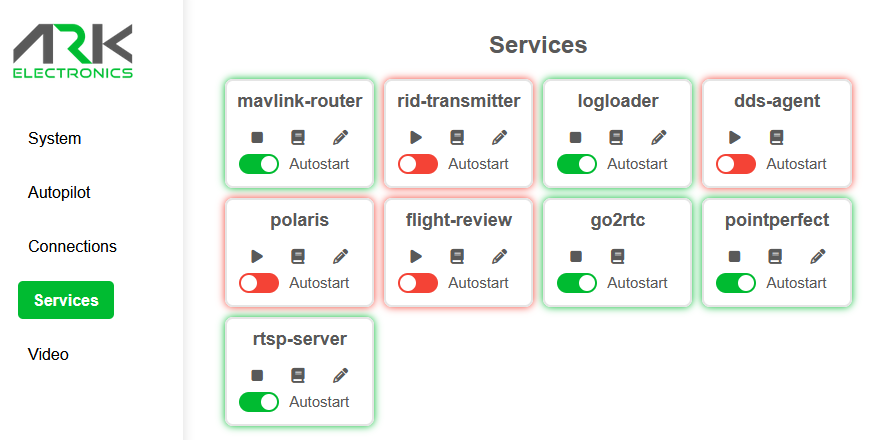
ARK-OS PR #102 wires the client in as an opt-in service, right alongside the existing polaris client for Point One’s corrections network — pick whichever provider fits your coverage area and your contract. The integration adds the systemd unit, a default config, and a dedicated mavlink-router UDP endpoint on port 14554.
Configuration happens in the web UI’s service editor. Out of the box, only two fields need your attention — the NTRIP username and password from your Thingstream account. Everything else ships with working defaults:
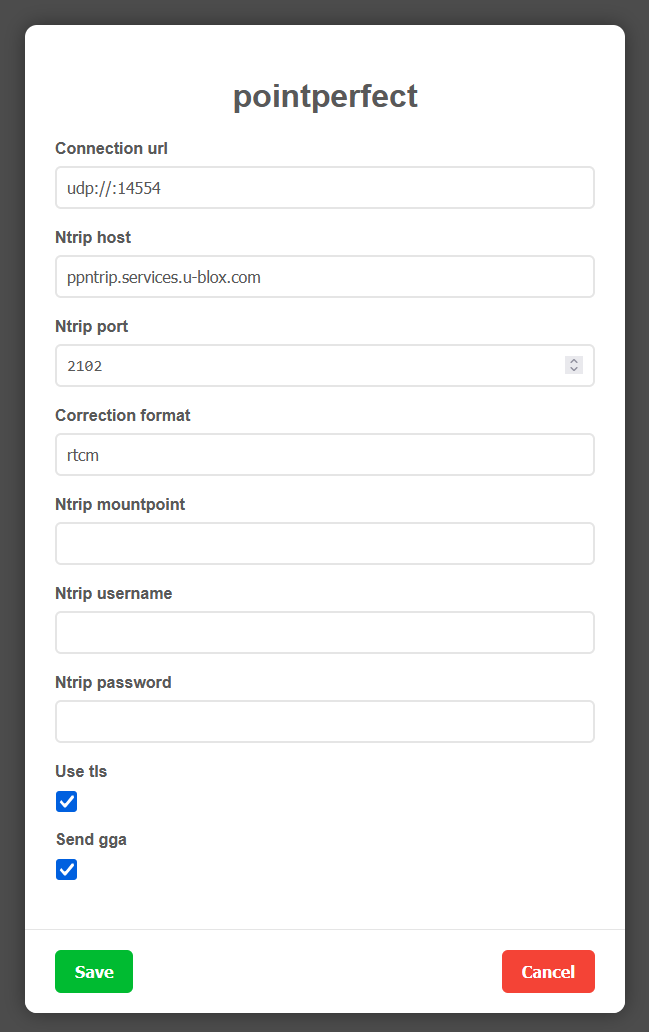
| Setting | Default | Notes |
|---|---|---|
| connection_url | udp://:14554 | MAVLink endpoint — matches the dedicated mavlink-router port ARK-OS sets up |
| ntrip_host | ppntrip.services.u-blox.com | u-blox PointPerfect NTRIP caster |
| ntrip_port | 2102 | TLS port; 2101 for plain TCP |
| correction_format | rtcm | spartn recommended on receivers that decode it (F9P, X20); rtcm works everywhere |
| ntrip_mountpoint | — | blank auto-selects NEAR-RTCM / NEAR-SPARTN |
| ntrip_username / _password | — | per-device credentials from the Thingstream portal |
| use_tls | true | encrypts the caster connection |
| send_gga | true | required — the caster localizes corrections to your reported position |
Getting started
- Create a PointPerfect NTRIP thing in the Thingstream portal and note its username and password — credentials are per-device.
- Update to the latest ARK-OS release on your companion computer — grab the
.debfrom the releases page and install it withapt. - In the web UI, open Services → pointperfect, hit edit, and paste in your credentials. If your receiver decodes SPARTN (F9P, X20), pick
spartnfor the best performance; otherwise pickrtcm. - Save, start the service, and flip on Autostart.
- Watch your GPS status climb from 3D lock to RTK float to RTK fixed — anywhere in the coverage area, with no base station in sight.
On the vehicle side, the client pairs with any RTK-capable GNSS. On receivers that decode SPARTN — the ARK RTK GPS and all-band ARK X20 RTK GPS — run it for the best performance; everything else, like the ARK G5 RTK GPS and the Septentrio-based ARK MOSAIC-X5 RTK GPS, takes the universal RTCM stream. The service itself runs on any ARK-OS companion computer:
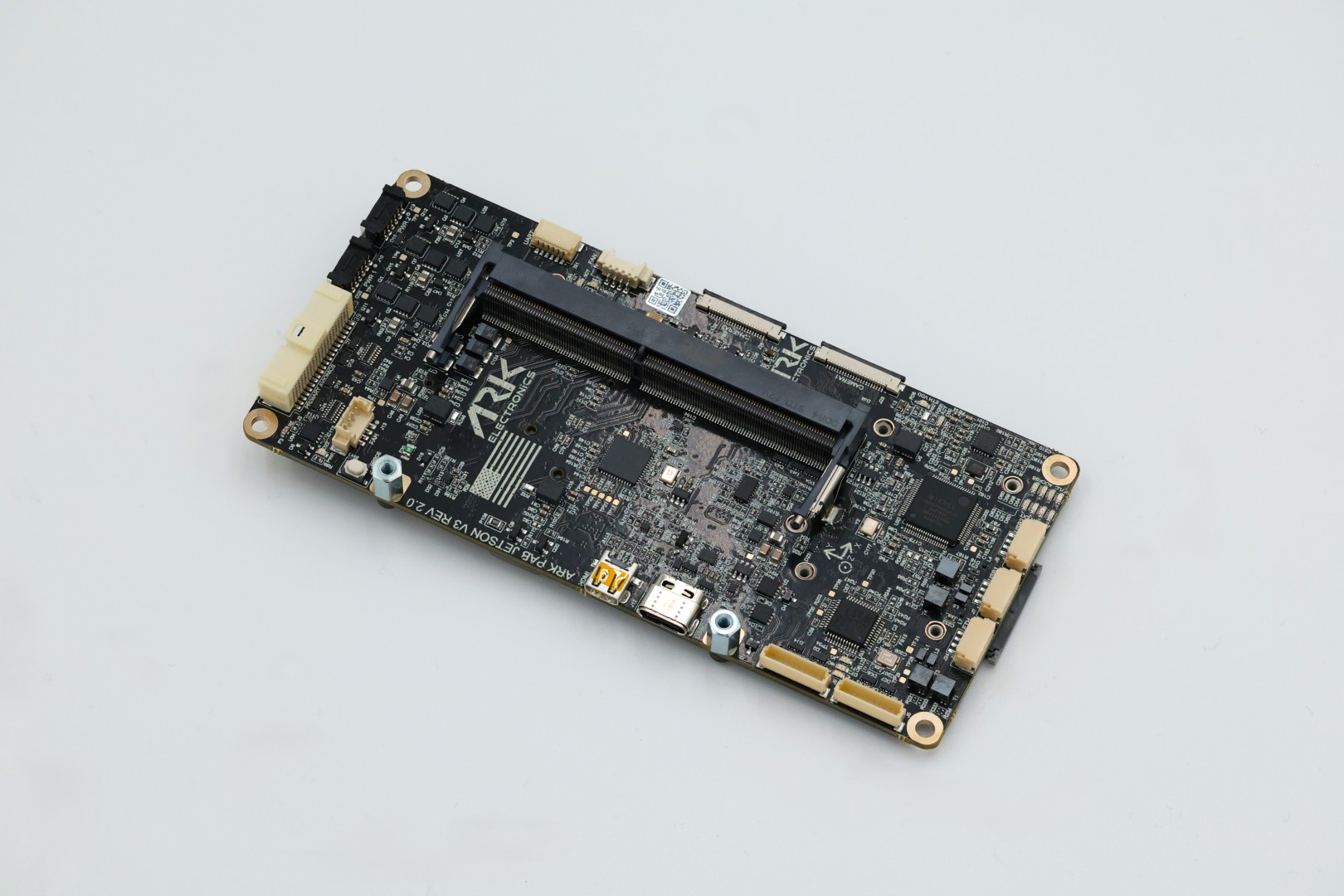
Runs ARK-OS · Jetson Orin
ARK Jetson PAB V3
USA-built, NDAA-compliant Jetson Orin carrier in the Pixhawk Autopilot Bus form factor. Ships with ARK-OS — enable pointperfect from the web UI and corrections flow on boot.
The client is MIT licensed and deliberately small — if you want to run it outside ARK-OS, it builds with make, takes a single TOML config file, and talks to anything MAVSDK can reach. Issues and PRs welcome on GitHub.
One less tripod in the truck.

Alex Klimaj is the founder and CEO of ARK Electronics, a US-based manufacturer of NDAA-compliant drone and robotics electronics. Find him on GitHub.